




Server update version 2.4.1 (Gira) / 2.3.2 (JUNG)
IMPORTANT SECURITY UPDATE.
Perform now: Server update version 2.4.1 (Gira) / 2.3.2 (JUNG)
The update secures the connection between the eNet server and the app until 31 December 2037.
Why is the update necessary?
A security-related certificate for your eNet server expires on 28 February 2026. This certificate will be renewed with versions 2.4.1 (Gira) and 2.3.2 (JUNG).
All eNet Servers from version 2.0 onwards must be updated to the current version. If the update is not carried out in good time, access will no longer be possible from 27 April 2026.
Your advantages with the update
- Continued convenient access via the eNet SMART HOME app
- Reliable use via display devices in the local network
- Full system functionality and permanent security
➡ Install the update by 27 April 2026 at the latest!
Our recommendation
For easy implementation, use the ‘Automatic download’ update procedure. Details can be found in the update guide or in the video tutorial.
FREQUENTLY ASKED QUESTIONS.
My app is displaying the error notification “Connecting eNet Server …” , what do I do?
If the message “Connecting eNet Server …” is continuously displayed in a blue bar in your app, then your app is no longer able to synchronise the server data or establish a connection to the server.
This may arise if your server has not yet been updated to the current Server Version 2.4. Please check your server version via the web interface eNet SMART HOME connect. If the version of the server is older than 2.4, please update to Version 2.4 as described in our update guide.
After installation of the update, it will soon be possible to re-establish a connection and the server data can be visualised again. If this process does not solve the problem, you, the user, can log out and log back on in order to refresh the server connection.
When logging on, my app displays “No eNet Server found” – what can I do?
If the error notification “No eNet Server found” ("Connection problem" on Android devices) is displayed when you try to log on and it is not possible to log onto the local server even though there is a network connection and the data has been entered correctly, then your app can no longer connect to the server.
This is most often case if your server has not yet been updated to the current Server Version 2.4 (Gira) or 2.3 (JUNG) Please check your server version via the web interface eNet SMART HOME connect. You can still log on via the web interface without any restrictions.
If the version of the server is older than 2.4, please update to Version 2.4 or 2.3 as described in our update guide.
The update was not successful, what do I do if an error notification is displayed?
The update procedure can be restarted at any time and it is usually the case that the update installs without any errors.
Possible sources of error in the case of the “Manual download” update procedure:
- The update file used is from the wrong manufacturer.
Remedy: Download the update file from the right manufacturer and try again. - The currently installed version of the server does not support the update file used.
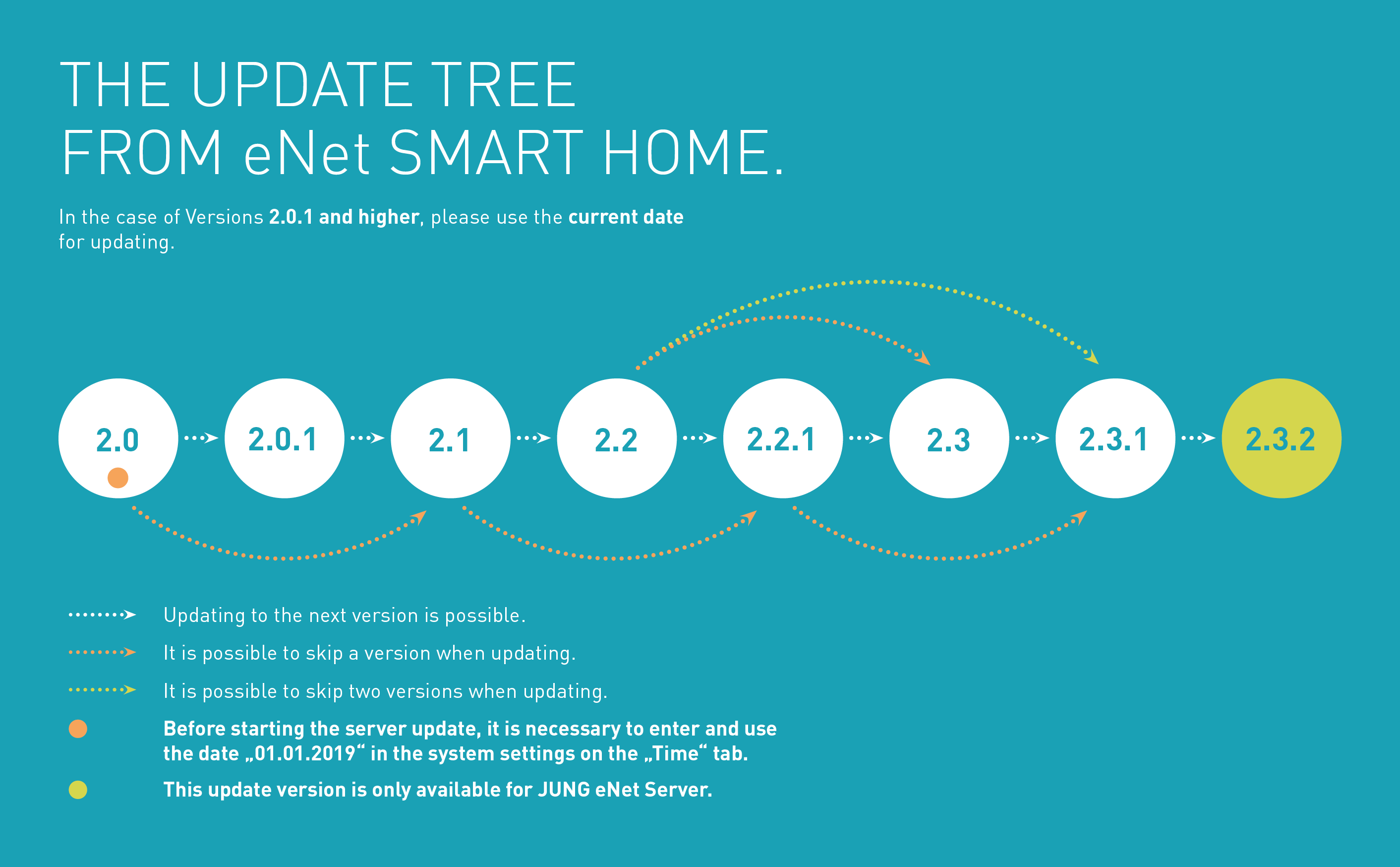
Remedy: Download an update file that is supported as per the update tree and try again.
Which update is downloaded when a new version is available?
The prerequisite for this is that the “Automatic search” or “Automatic download” update procedure is selected.
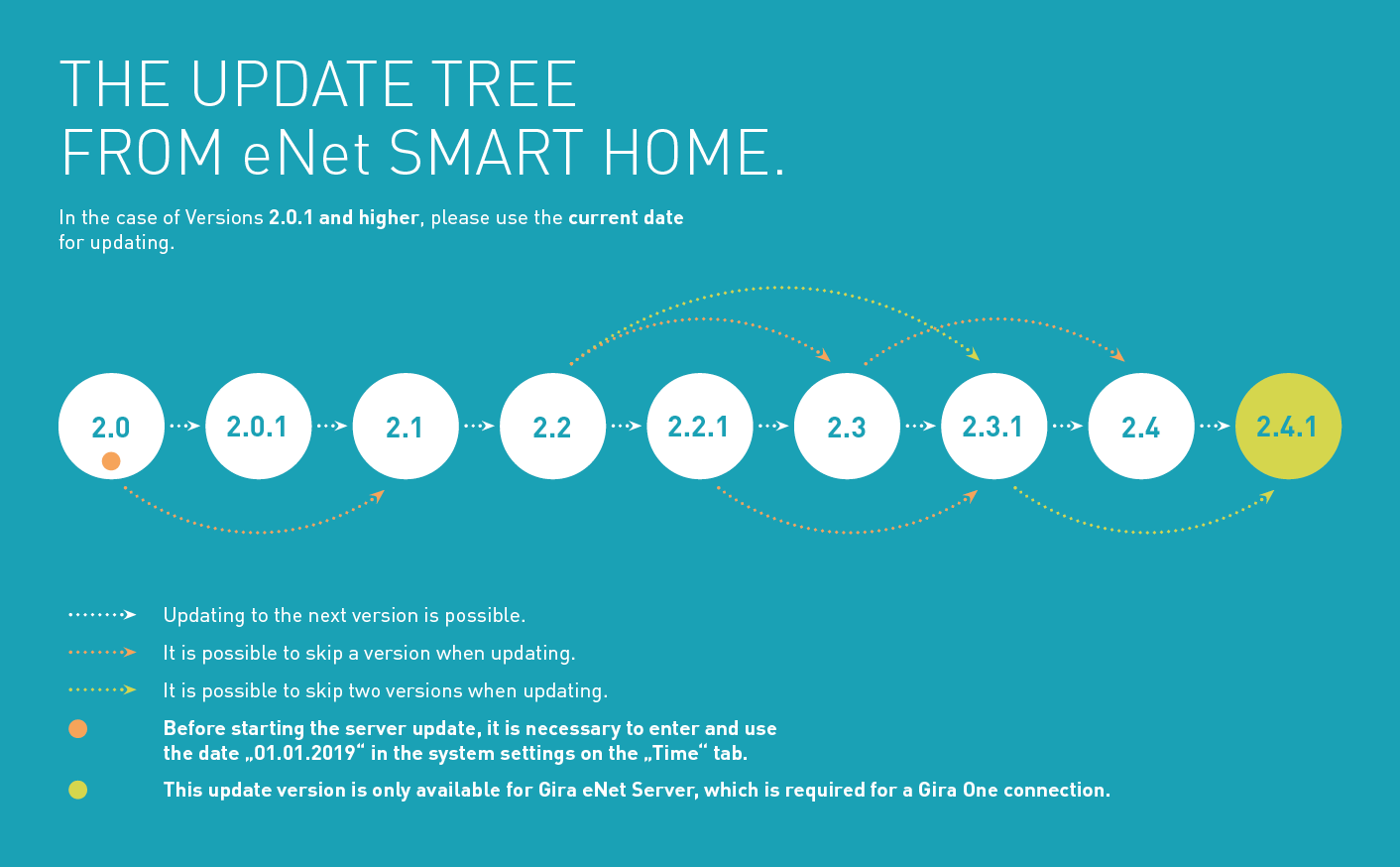
With the automatic update procedure, the most recent compatible version as per the update tree is preselected online and is installed on the eNet Server with the update is started.
Example 1: eNet Server has installed version 2.0
- An update to 2.1 is offered and can be installed. After that, the update from 2.1 to 2.2 is offered. On the basis of 2.2, the update to V2.3.1 is offered and can be installed.
Example 2: eNet Server has installed version 2.2.1
- The update to version 2.4 is offered and can be installed.
Is it also possible to update the server to Version 2.4.1 or 2.3.2 without an active internet connection?
Yes, an update to Version 2.4.1 or 2.3.2 is also possible without a simultaneously active internet connection. Download the update file to a local file directory and then select this in the file browser so that you can then upload it to the eNet Server. The new version can now be installed.
What additional factors need to be considered for an eNet Server update?
- After configuration changes in eNet SMART HOME connect and before software updates, one should export the server project and save it locally so that all current data is available at all times.
- Ports 20 and 21 should be activated in your network router and checked as to whether FTP connections are permissible. The eNet Server uses the so-called FTP (file transfer protocol) for the automatic update procedure, and the router settings may partially prohibit this. Firewalls may also partially block access to this remote end, and an access release must be correspondingly set up.
NOT A SERVICE PARTNER?
If u need help with the update, please contact an
eNet SMART HOME Service Partner!